SUMMARY:
This article contains a brief overview of login procedures for Shorecrest Family Members to the new Schoology Learning Management System. The Schoology system is the primary tool used by teachers and administrators to communicate with students and their family members regarding curriculum and coursework.
Schoology is a new system for the 2022-2023 school year. It is important to note that Family members access Schoology in a slightly different manner than their children.
INTENDED AUDIENCE:
Shorecrest Family Members
REQUIREMENTS:
- Internet Connected Device with browser (Chrome Recommended)
- Shorecrest provided system credentials
PROCEDURES:
1.) Go to the following URL:
2.) Enter your Shorecrest-issued credentials (username and password) in the "Sign in to Schoology" box.
3.) Click the "Remember my School" checkbox.
4.) Type "Shorecrest" into the school search box. Select the choice "Shorecrest Preparatory School" that appears marked with a green arrow and highlighted in blue.
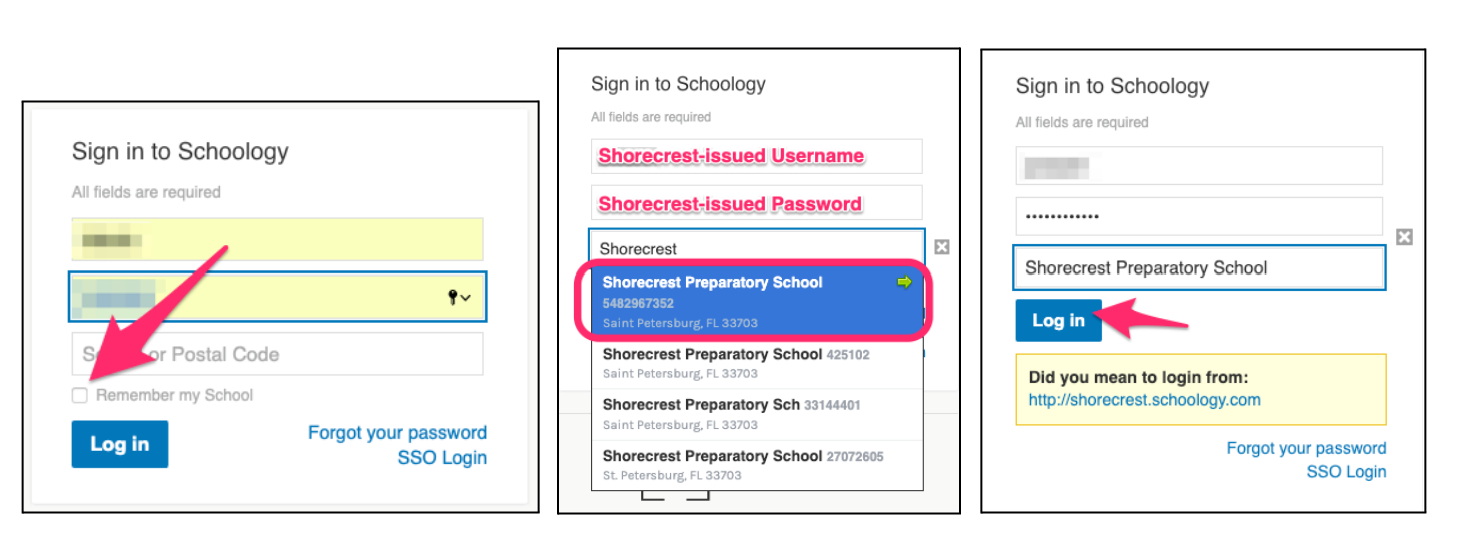
5.) After completing the first time login walkthrough tutorial, check to make sure that you are viewing your child’s profile in the upper right corner. The view may default to your parent profile and not display all relevant content.

ADDITIONAL REFERENCE:
KEYWORDS: login, Schoology, authentication